The link for SSC MTS Self Slot Booking 2026 has been activated on 16th January 2026 at the official website www.ssc.gov.in. Applied candidates for the SSC Multi-Tasking Staff and Havaldar exam must now select their preferred exam dates, cities, and shift timings via the self-slotting system. It is compulsory to complete the slot selection process; otherwise, the admit cards will not be issued.

Candidates should log in with their registration ID and password to choose their preferred exam shift, date, and location. The Staff Selection Commission (SSC) has introduced a Slot Booking process, giving candidates the option to select their exam city, date, and shift.
SSC MTS Slot Booking 2026 Activated
The SSC has introduced a self-slot selection system to make exam scheduling more candidate-friendly and efficient. Candidates who have applied for the MTS Examination 2025 can now choose their preferred exam date, city, and time slot till 25th January 2026 (11 pm). Through the exam, a total of 7948 vacancies will be filled for Multi-Tasking (Non-Technical) Staff and Havaldar (CBIC and CBN) posts.
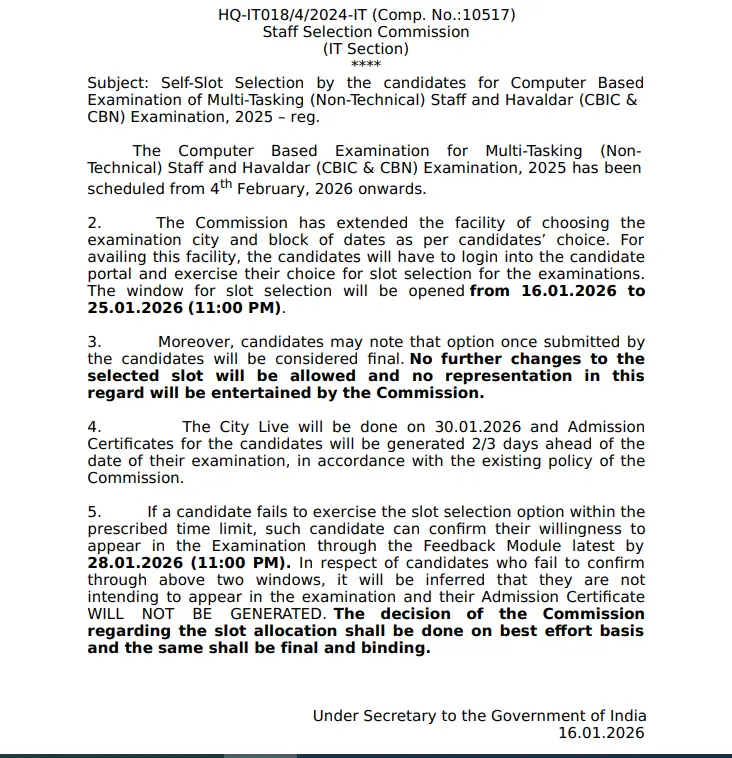
SSC MTS Self Slot Booking 2026 Official Link
Staff Selection Commission (SSC) has started accepting the request for SSC MTS Self Slot Booking 2026 for Multi-Tasking (Non-Technical) Staff and Havaldar (CBIC & CBN) Examination, 2025. For the reference of candidates, the SSC MTS Self Slot Selection 2026 Link is also updated here as activated by SSC at the official website www.ssc.gov.in.
Key Details
Activation Date: 16th January 026—log in immediately to secure preferred slots amid high demand.
Purpose: Choose exam city, date, and shift timing to fit your preparation schedule.
Compulsory: SSC mandates self-slotting; unbooked candidates risk missing exams.
Steps for SSC MTS Self Slot Booking 2026
The officials have released the notice regarding the dates and steps for Self-Slot Selection for SSC MTS Examination 2025. Follow the Step-by-Step Guide for SSC MTS Exam Slot Booking.
- Candidates must first visit the official website of the Staff Selection Commission at www.ssc.gov.in.
- After reaching the homepage, log in to the candidate portal using your registered credentials and navigate to the “My Application” section.
- On the application dashboard for the SSC Multi-Tasking (Non-Technical) Staff and Havaldar (CBIC & CBN) Examination, 2025, click on the option “Select City, Exam Date, Shift.”
- Carefully read all the general instructions displayed on the screen and then click on “Get Slot Details.” The system will show the availability of exam slots for the three cities selected during the application process.
- Available slots will be indicated by a green “Select” icon, allowing candidates to choose their preferred exam date and shift.
- Once a slot is selected, it will turn green for confirmation.
- Finally, candidates must click on “Validate & Submit” and complete the process by entering the OTP sent to their registered mobile number or email ID.
- If the preferred exam slots are unavailable, candidates should choose a different exam date or select an alternate city from the options displayed on the screen.
- The portal will show the slot status for each shift, and if all shifts in the selected cities are marked as unavailable, candidates must use the “Choose Alternate City” option to proceed.
Common mistakes to avoid during SSC MTS Slot Selection
Common mistakes to avoid during SSC MTS slot selection include:
1. Delaying slot booking: The slot booking window is limited and slots fill up quickly. Candidates should book as early as possible to secure their preferred exam city, date, and shift.
2. Ignoring instructions: Candidates often skip reading general instructions and important points displayed during slot selection. These guidelines are crucial to selecting valid slots and understanding the process.
3. Not verifying choices before submission: Once a slot is selected and submitted with OTP validation, the choice is final and cannot be changed. Double-checking selected city, date, and shift is essential.
4. Overlooking alternate cities or dates: If the preferred slot is unavailable, candidates must promptly choose alternative cities or dates from their previously opted choices instead of waiting or missing the deadline.
SSC MTS 2026 Shift Timings
Candidates can choose their preferred exam date and shift during the SSC MTS Self Slot Booking 2026 process. The SSC MTS exam will be held in 4 shifts each day, and the exam will be 90 minutes.
What After SSC MTS Slot Selection?
After the slot selection, SSC releases the SSC MTS Admit Card 2026. The admit cards bout the exam centre, exam date, and shift allotted based on the candidate’s slot selection. Candidates can download it by visiting the official website https://ssc.gov.in/ using their credentials like Registration Number & password.